Add-ons · Functional · NOVAGO Delivery Management

Last-mile delivery built into Business Central — one stack, one team.

Load planning · Route map planning · Live driver tracking · Van sales · Proof of delivery · Built on Microsoft Dynamics 365 Business CentralNovasoft product for grocery, B2B and wholesale teams across UAE, KSA, India and USA.

2-4 wksTypical rollout
4Delivery centres
24/7NovaCare support
Definition · What it is

The delivery operations layer for Business Central.

NOVAGO Delivery Management is a native Microsoft Dynamics 365 Business Central extension that turns a day’s Sales Orders, Sales Invoices, Transfer Orders, Returns, Pickups and Payments into routed trips with vehicles, drivers, proof of delivery, cash collection and end-of-day settlement — without leaving Business Central.

It replaces the spreadsheets, the WhatsApp groups and the third-party fleet tracker that distribution businesses on Business Central typically stitch together. Data lives in BC tables, posts to the BC general ledger, and respects BC security — see Microsoft Learn for Business Central for the platform foundation NOVAGO extends.

Five named pillars

Plan. Route. Track. Sell. Settle.

Each pillar lives inside Business Central as a native feature — not a separate app, not a side database, not a sync job.

01 · Plan

Load Planning Workbench

Pick the day, pick the location, refresh the workbench. NOVAGO pulls every relevant document due for delivery and aggregates weight, volume and amount — ready for trip assignment.

  • Mixed document types in one wave — Sales Order, Sales Invoice, Transfer Order, Returns, Pickups, Payments
  • Capacity-aware vehicle and driver assignment
  • Day-of-week service windows configured per location
  • Status flow Draft → Released → Finished
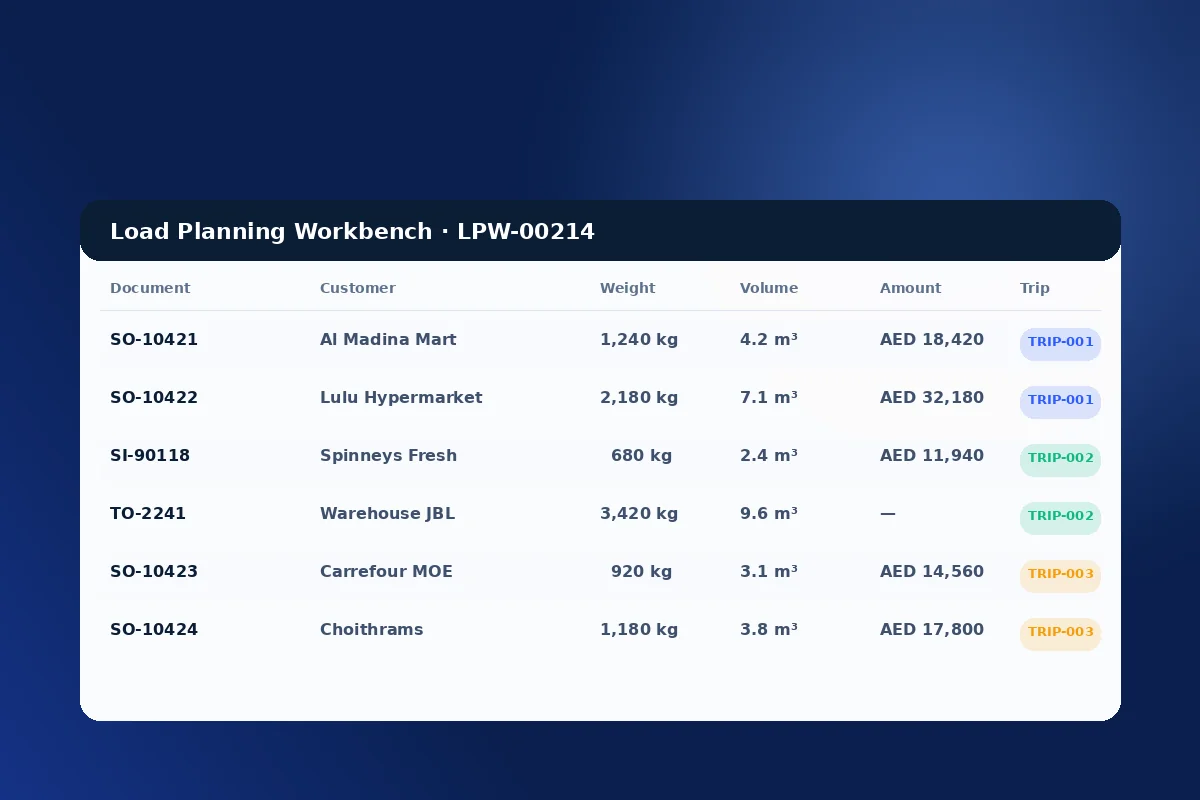
NOVAGO Load Planning Workbench showing mixed Sales Orders
02 · Route

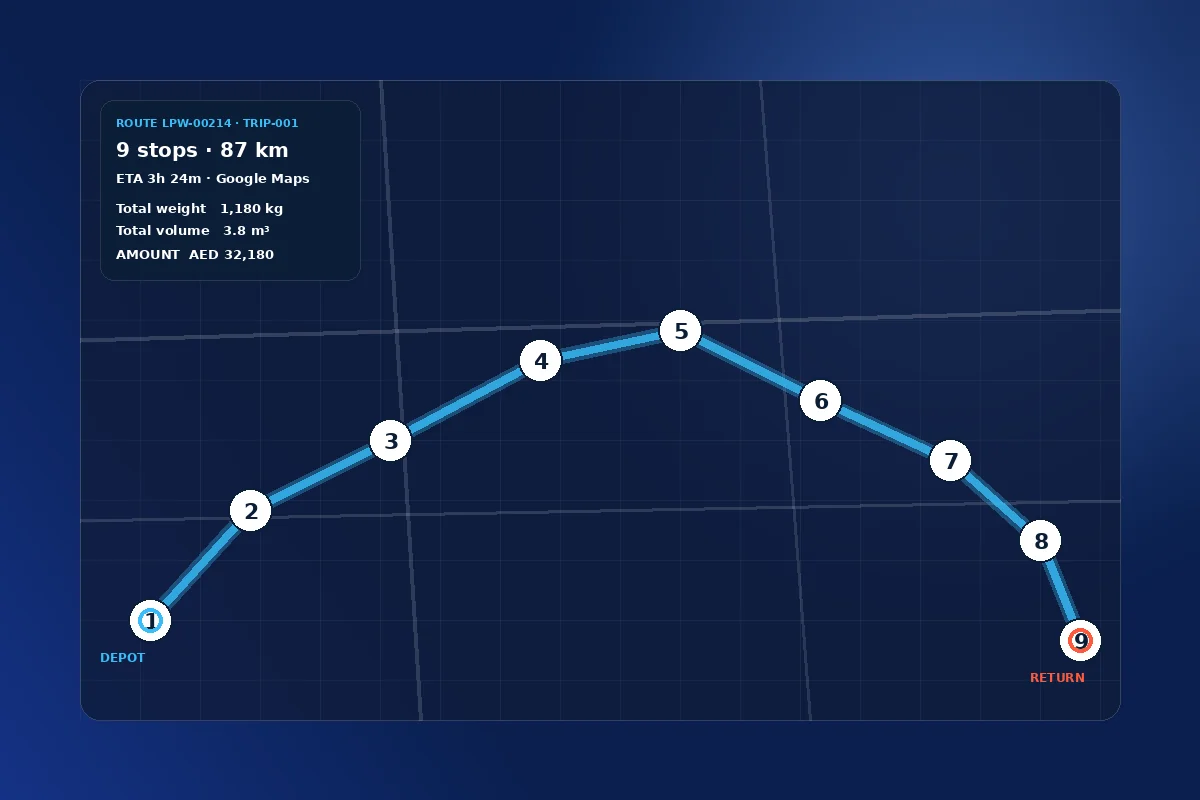
Route Map Planning, with Google Maps

Multi-stop route generation against the Google Maps Distance Matrix API. Distance and duration land on every stop, sequence numbers govern the drive order, and total trip mileage rolls up to the Trip Master.

  • Multi-waypoint routing with optimal sequencing
  • Distance and duration per stop, total per trip
  • Haversine fallback for offline distance calculation
  • Latitude and longitude stored on every Customer, Ship-to and source document
Nine-stop route map inside Business Central with numbered waypoints
03 · Track

Live driver tracking

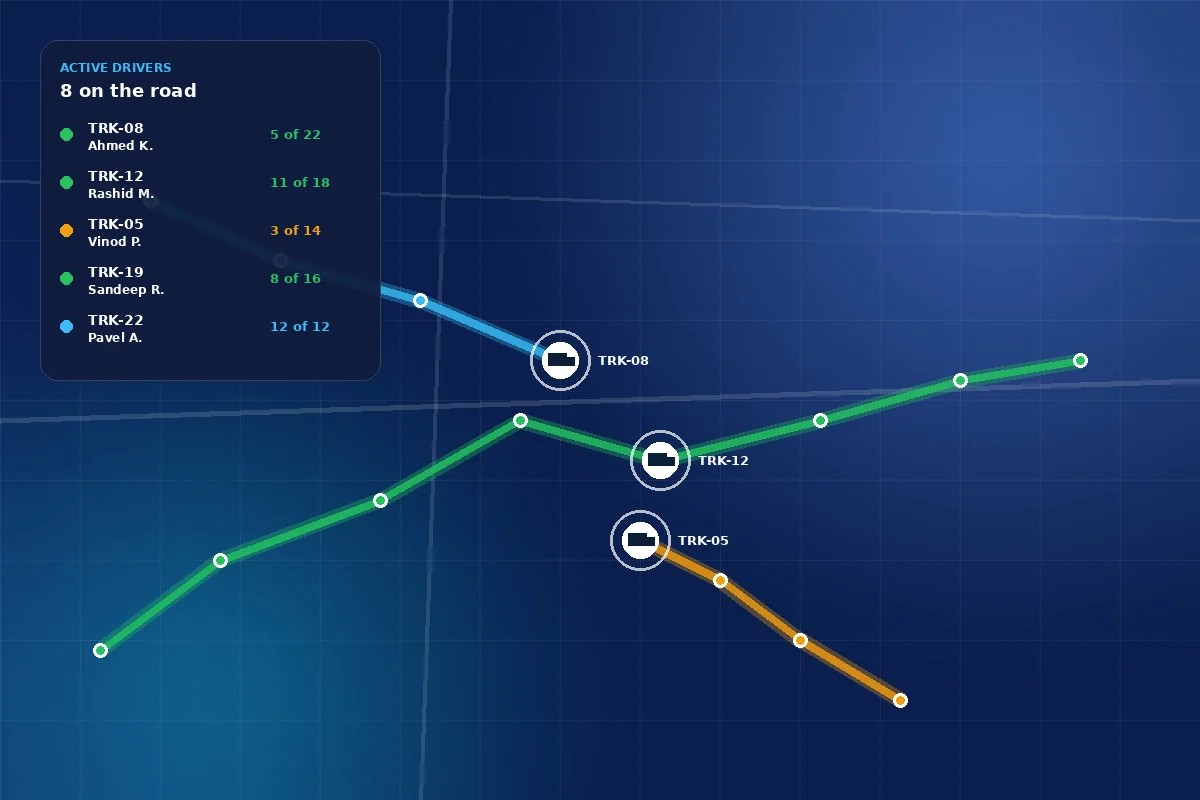
Drivers run a companion mobile app that talks to NOVAGO through [ServiceEnabled] API endpoints. As each stop is marked delivered, rescheduled or returned, the dispatcher’s Role Centre updates in real time.

  • Live fleet map view inside Business Central
  • Driver Role Centre on web or tablet for in-vehicle use
  • Role Centre cues: Open / Closed Tripsheets, Open Statements, Active Vehicles
  • Per-stop status Pending → Delivered → Undelivered → Rescheduled → Returned
Live driver tracking dashboard with three trucks plotted
04 · Sell

Van sales

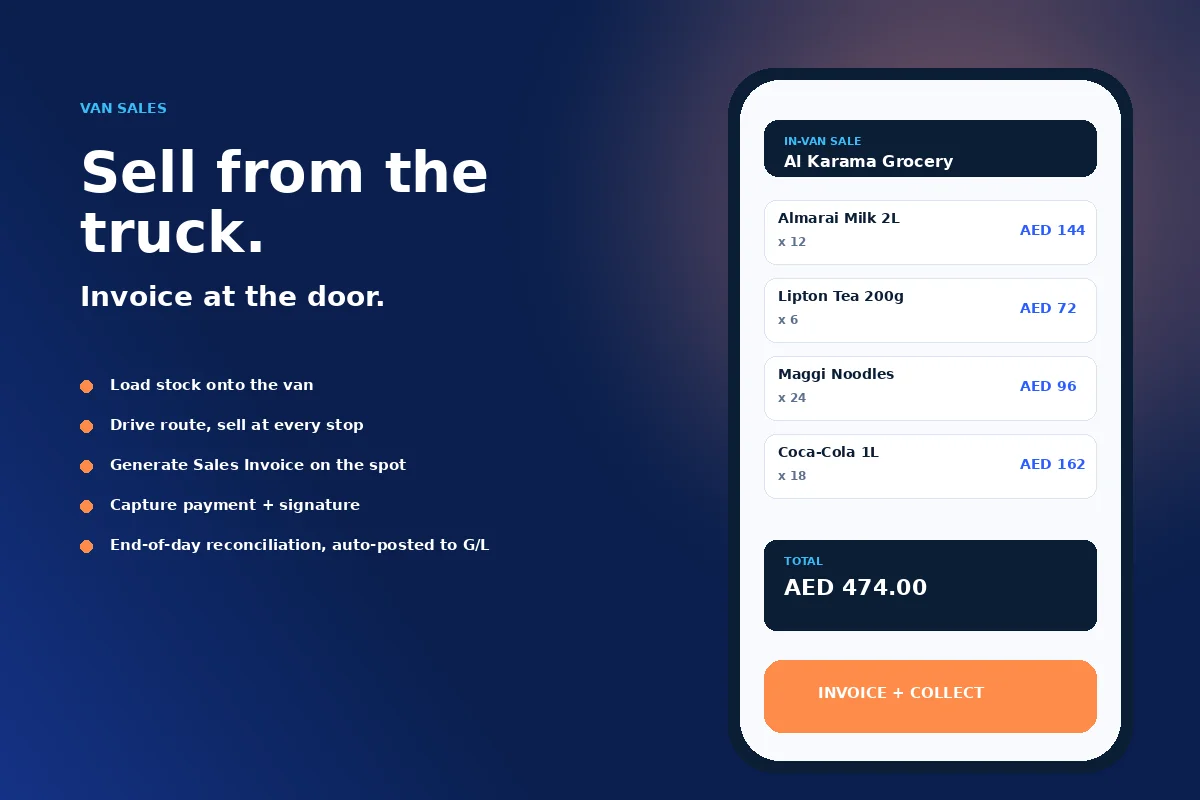
Drivers leave the depot with stock loaded on a Vehicle Sales tripsheet, sell at customer locations as they go, generate a Sales Invoice on the spot, collect payment — and at end-of-day the system reconciles loaded versus sold versus returned versus cash collected.

  • Vehicle Sales flag on Trip Header, Sales Header, Invoice Header and Credit Memo
  • Driver Role Centre as the in-van console
  • Return unsold stock to inventory automatically
  • Loaded vs sold vs returned reconciliation as part of settlement
NOVAGO van sales mobile screen with cart items priced
05 · Settle

Proof of delivery + driver settlement

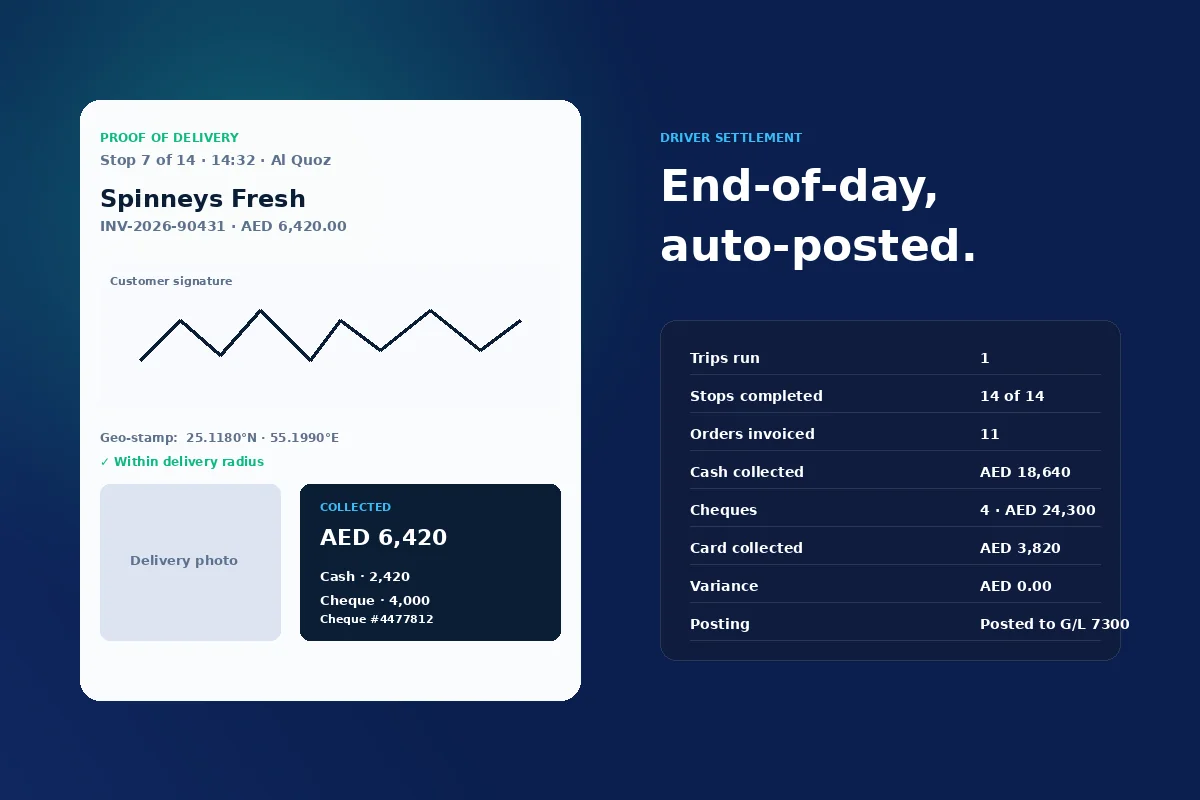
Every stop captures customer signature with geo-stamp and timestamp, a delivery photo, and multi-tender payment. End-of-day, the Open Statement auto-calculates per driver, posts to a Posted Statement and writes G/L entries through General Journal Lines.

  • Signature, photo, latitude, longitude and timestamp per stop
  • Multi-tender per stop — cash, cheque (with number and date), card
  • Open → Calculated → Posted statement workflow
  • Automatic G/L posting with charge accounts and rounding
Proof of delivery card with customer signature
Customer side · Engagement

What the customer experiences at the door.

A delivery addon is only as good as the moment of handover. NOVAGO instruments the customer touchpoint — signature, photo, geo-stamp, multi-tender payment, on-the-spot Sales Invoice and an SMS receipt — so every drop closes cleanly in front of the buyer.

Signature capture

Customer signs on the driver’s phone or in-van tablet. The captured signature lands on the Delivery Shipment record with date, time, latitude and longitude.

Delivery photo

Optional photo at the door — box on the receiving dock, signed stock-card, customer holding the goods. Uploads back to Business Central tied to the stop.

Multi-tender at the door

Cash, cheque (with cheque number and date), card and credit-limit balance — all captured at the stop and reconciled in the end-of-day Open Statement.

On-the-spot Sales Invoice

For van sales, the driver issues the BC Sales Invoice at the customer’s location. Invoice is fully compliant — ZATCA Phase 2, UAE FTA, country-specific number series.

SMS notifications

Customer receives an SMS when the driver is en-route and when the stop is marked delivered. Twilio integration ships in the box; templates configurable per location.

Geo-stamped proof

Latitude and longitude of every signature lands on the Delivery Shipment. Within-radius check confirms the driver was at the customer site — not at a coffee shop two blocks away.

Who it serves

Grocery. B2B. Wholesale.

One product, three operating modes. Each is configured at setup — same Business Central tenant, same NOVAGO extension, different defaults.

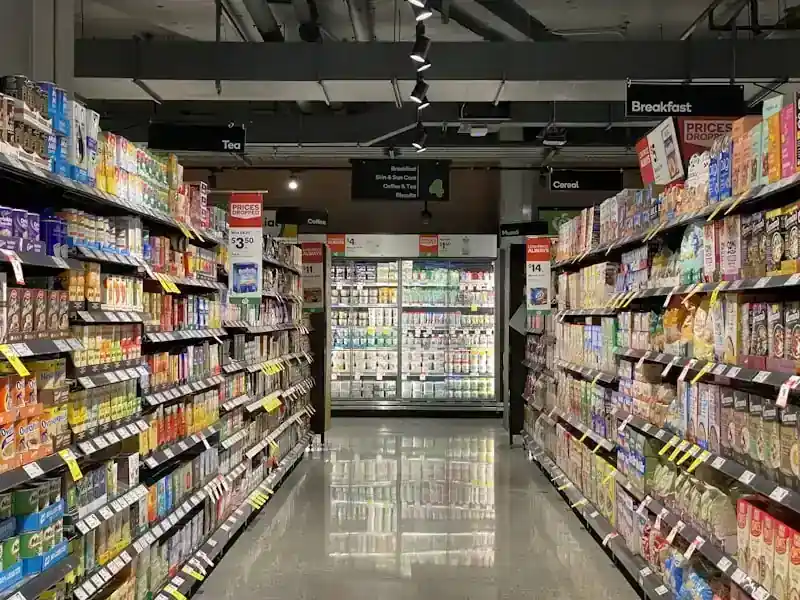
Grocery and FMCG distribution — supermarket aisle showing wholesale supply to retail chains

Grocery & FMCG wholesalers

Daily delivery windows, tight time slots, cheque-heavy collections, returns and reschedules with reason codes. NOVAGO ships with day-of-week service windows, location-tender mappings and end-of-day cheque tracking. Grocery practice

B2B distribution — HORECA

B2B distributors

HORECA supply, building materials, pharma, electrical, packaging and industrial. Multi-document workbench mixing Sales Orders, Posted Invoices, Transfer Orders and Returns on one trip with per-stop external doc numbers and customer signatures. F&B practice

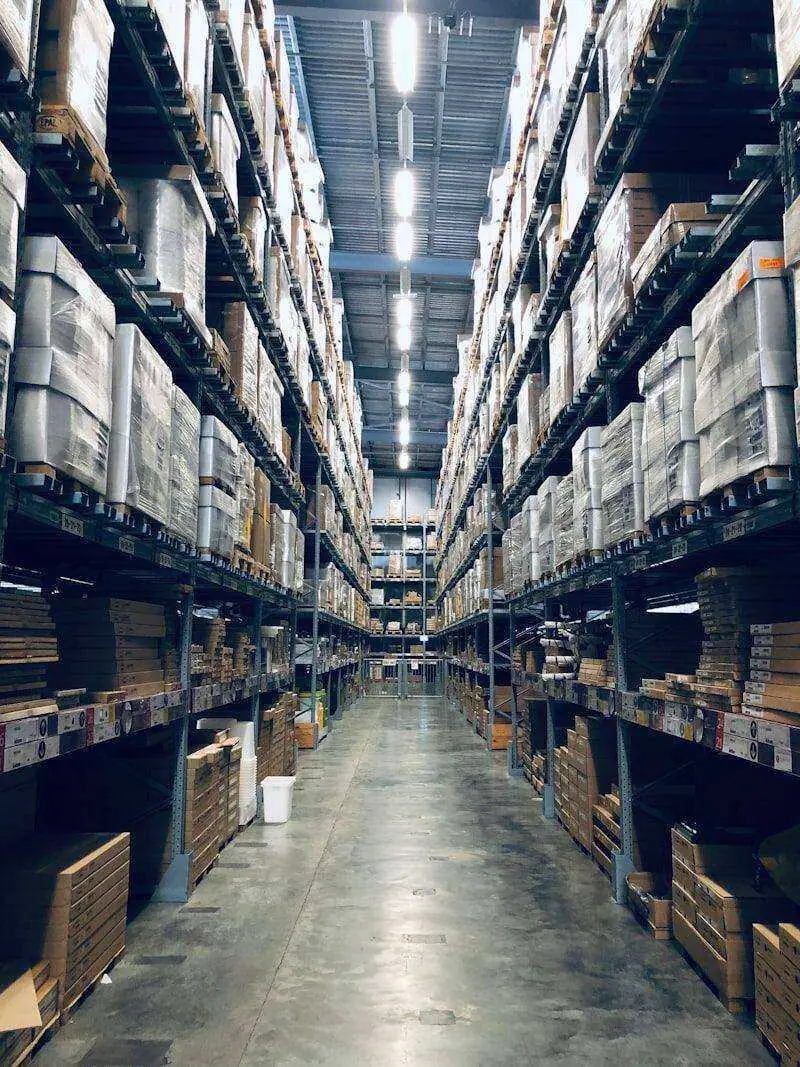
Wholesale and cash-and-carry — stacked pallets and warehouse operations powering

Wholesale & cash-and-carry

Drivers leave with stock loaded, sell out of the van, generate Sales Invoices at the door, return unsold stock. End-of-day settlement reconciles loaded vs sold vs returned vs cash and auto-posts to the G/L. Wholesale practice

What's new · 2026 launches

Latest NOVAGO innovations for delivery operations.

Fresh capabilities released in 2026 — built by Novasoft on top of Business Central, the Microsoft cloud and the Google Maps Platform.

NEW · 2026

Live driver tracking dashboard

Dispatcher Role Centre with a real-time fleet view inside Business Central. See where every vehicle is, what is delivered, how much cash has been collected.

Pillar 03
UPDATED · May 2026

Google Maps route planning

Multi-stop route generation against the Distance Matrix API. ETAs and per-leg distance roll up to the Trip Master automatically.

Pillar 02
NEW · 2026

Van Sales mode

Drivers invoice from the truck at the customer’s door. End-of-day reconciles loaded vs sold vs returned and auto-posts to the G/L.

Pillar 04
UPDATED · Q2 2026

ZATCA-ready invoicing on delivery

Saudi Arabia ZATCA Phase 2 clearance integrated with the in-van Sales Invoice. Compliant invoices generated at the customer location in real time.

Explore ZATCA Phase 2
AVAILABLE NOW

Signature + geo-stamp PoD

Customer signature captured on phone or tablet, geo-stamped with latitude, longitude and timestamp. Optional delivery photo at the door.

Pillar 05
AVAILABLE NOW

NovaCare 24/7 wrap

Managed support across tier-1 to tier-3, SLA-backed, multi-timezone. Helpdesk plus monthly KPI review keep the delivery operation healthy after go-live.

NovaCare 360°
How we deliver

Four stages. Fixed scope. 2–4 weeks to production.

Novasoft delivers NOVAGO the same way we deliver every Business Central project — in four named stages with weeks attached. No surprise scope, no open-ended billing.

01

Assessment

Discovery, fleet sizing, document-type review, Google Maps API provisioning, NOVAGO Setup walkthrough.

Days 1–3

02

Design

Master data design — Drivers, Vehicles, locations, tender mappings, ship-to address geocoding. NOVAGO Setup configured.

Week 1

03

Implementation

Pilot location, two drivers, one product family. Workbench → trip → delivery → settle end-to-end. Driver mobile app deployed.

Week 2

04

Go-Live

All locations, all drivers, daily dispatch in production. NovaCare 24/7 wraps the operation post go-live.

Weeks 3–4

From the field · Insight

More Novasoft perspectives

See NOVAGO running on Business Central.

30 minutes. One workbench. One trip. End-to-end — loaded, routed, delivered, settled, posted to the G/L.

Connect us · Get in touch

Book your NOVAGO demo.

Tell us about your fleet — how many drivers, what document types they ship, which Business Central version you’re on — and a Novasoft NOVAGO consultant will be in touch within one business day.

  • Reply within one business day
  • 30-minute live walkthrough tailored to your operation
  • Pricing + rollout plan for your fleet size
  • 14-day pilot tenant available on request

Prefer email? [email protected] · contact page

Book a NOVAGO demo

Fill in your details and we’ll be in touch within one business day.

Request submitted

Thank you. A Novasoft NOVAGO consultant will contact you within one business day.

FAQ · Common questions

Questions about NOVAGO.

Is NOVAGO native to Business Central or a separate system?

Native. NOVAGO is a Microsoft-certified Business Central extension built in AL. It runs on Business Central cloud and on-premises. There is no separate database, no integration layer, no sync job. Data lives in Business Central tables and posts to the Business Central general ledger.

Does the driver need a smartphone? iPhone or Android?

Either. NOVAGO ships ServiceEnabled API endpoints. A companion driver app (Android or iOS) talks to those endpoints. The Driver Role Centre can also run in a web browser on a tablet mounted in the van — for operators who prefer not to issue phones.

How does NOVAGO handle van-sales returns?

Drivers can return unsold stock to inventory at end-of-shift. The driver settlement reconciles loaded vs sold vs returned. Variances flag to the dispatcher for follow-up before the statement is posted.

Can we collect partial payments at the door?

Yes. Each stop supports multi-tender (cash, cheque, card) with individual amounts. Balance, variance and cheque-number tracking are stored on the Delivery Shipment Payment record and roll up to the driver’s end-of-day Open Statement.

Does NOVAGO work for customer returns — reverse logistics?

Yes. Sales Return Order and Posted Return Receipt are first-class documents in the workbench. A driver can pick up returns on the same trip as a delivery, capturing reason codes and condition.

What does the Google Maps integration cost?

You provide a Google Cloud Console Maps API key. Billing is direct between you and Google — NOVAGO never bills you for map usage. Typical operators spend under USD 100 per month for a 20-driver fleet on the Distance Matrix and Directions APIs.

How long does a NOVAGO rollout take?

2 to 4 weeks for a multi-location production rollout. Days 1–3 for the extension install and Setup, Week 1 for master data, Week 2 for a pilot location, Weeks 3–4 for full production. NovaCare 24/7 wraps support after go-live.

Sources · Authority links used on this page
  1. Microsoft Learn — Dynamics 365 Business Central · Accessed May 2026
  2. Google Maps Platform — Distance Matrix API · Accessed May 2026
  3. LS Retail — LS Central · Accessed May 2026
  4. UAE Federal Tax Authority · Regulatory authority for VAT & e-invoicing
  5. Saudi Arabia ZATCA · Phase 2 e-invoicing authority
  6. Microsoft Learn India — Dynamics 365 documentation · Accessed May 2026
  7. Microsoft Solutions Partner directory · Microsoft Partner Network
Chat with us